Secure Score How-To

← Back to Secure Score Hub

How to Block Win32 API Calls from Office Macros in Microsoft 365

Last updated: April 2026

Office macros that call Win32 APIs are a well-known attack vector — malicious macros use low-level Windows API calls to download and execute payloads beyond what standard macro controls can detect. This guide walks you through enabling the Attack Surface Reduction rule in Microsoft Intune that blocks Win32 API calls from Office macros, closing this gap and lifting your Microsoft Secure Score.

This is a how-to page. The CTA stays soft, the steps stay clean, and the cluster links handle the rest.

What you'll achieve

Blocked macro attack pathOffice macros will be prevented from making direct Win32 API calls, removing a common technique used by malware to bypass macro security controls and execute payloads.
Reduced attack surfaceThe ASR rule will be active and enforced across Intune-managed devices, closing a high-risk gap frequently exploited in phishing and document-based attack campaigns.
Secure Score upliftOnce the rule is enforced in Block mode, Microsoft marks this recommendation as Completed, adding measurable points to your Microsoft Secure Score.

Why this setting matters

Office macros that call Win32 APIs can bypass standard macro security controls entirely. Instead of relying on scripting environments like VBA alone, they use direct Windows API calls to download files, inject code, or execute processes — making them significantly harder to detect with traditional endpoint controls.

  • Attackers use Win32 API calls within Office macros to download and execute payloads silently in the background.
  • This technique is widely used in commodity malware and targeted attacks delivered via phishing documents.
  • Blocking Win32 API calls from Office macros is a direct Microsoft Secure Score recommendation with immediate, measurable score impact once enforced.
Blocking Win32 API calls from Office macros is a proven, low-disruption ASR rule — high security value, applicable across all Office productivity environments, and a clear Secure Score win for any organisation running Microsoft 365.
Before you start

  • Microsoft 365 Business Premium, or Microsoft Defender for Endpoint Plan 1 or Plan 2 licence.
  • Global Administrator or Security Administrator permissions in your Microsoft 365 tenant.
  • Devices onboarded to Microsoft Defender for Endpoint and enrolled in Microsoft Intune.
  • Microsoft Intune configured for policy deployment — the recommended method for most organisations.
  • Deploy to a test group first and monitor for 7–14 days in Audit mode before switching to Block to confirm no business-critical macros are affected.

Step-by-step

Use these steps to create, configure, assign, and confirm the Win32 API call blocking ASR rule in Microsoft Intune.

1
Screenshot required

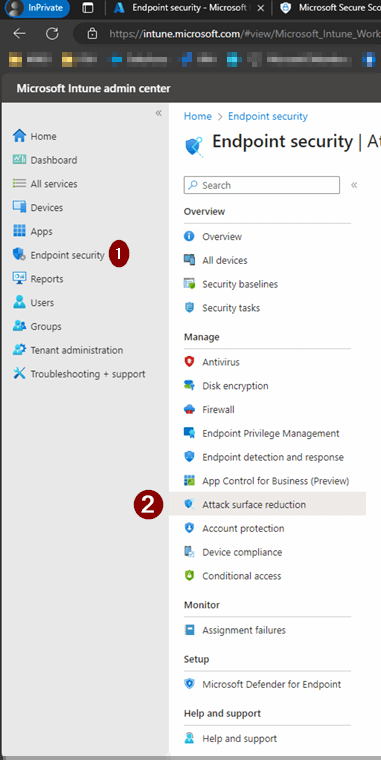
Open Microsoft Intune Admin Center and navigate to Endpoint Security

Sign in to intune.microsoft.com with a Global Administrator or Security Administrator account. In the left navigation, click Endpoint security, then select Attack surface reduction to view existing policies.

Open Microsoft Intune Admin Center and navigate to Endpoint Security
2
Screenshot required

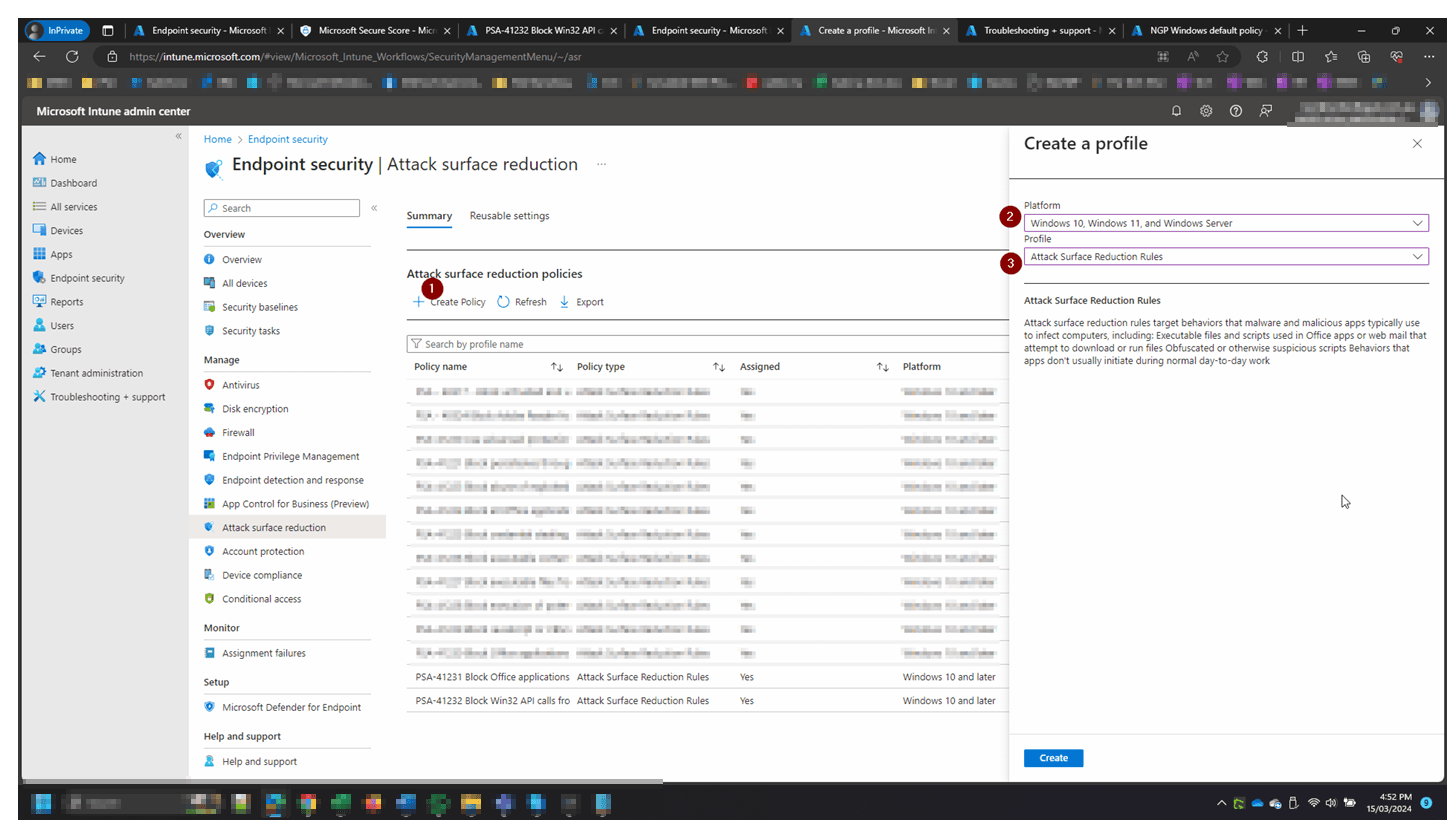
Create a new Attack Surface Reduction policy

Click Create Policy. On the Create a profile panel that appears on the right, select Windows 10, Windows 11, and Windows Server as the platform, then choose Attack Surface Reduction Rules as the profile type. Click Create to proceed.

Create a new Attack Surface Reduction policy
3
Screenshot required

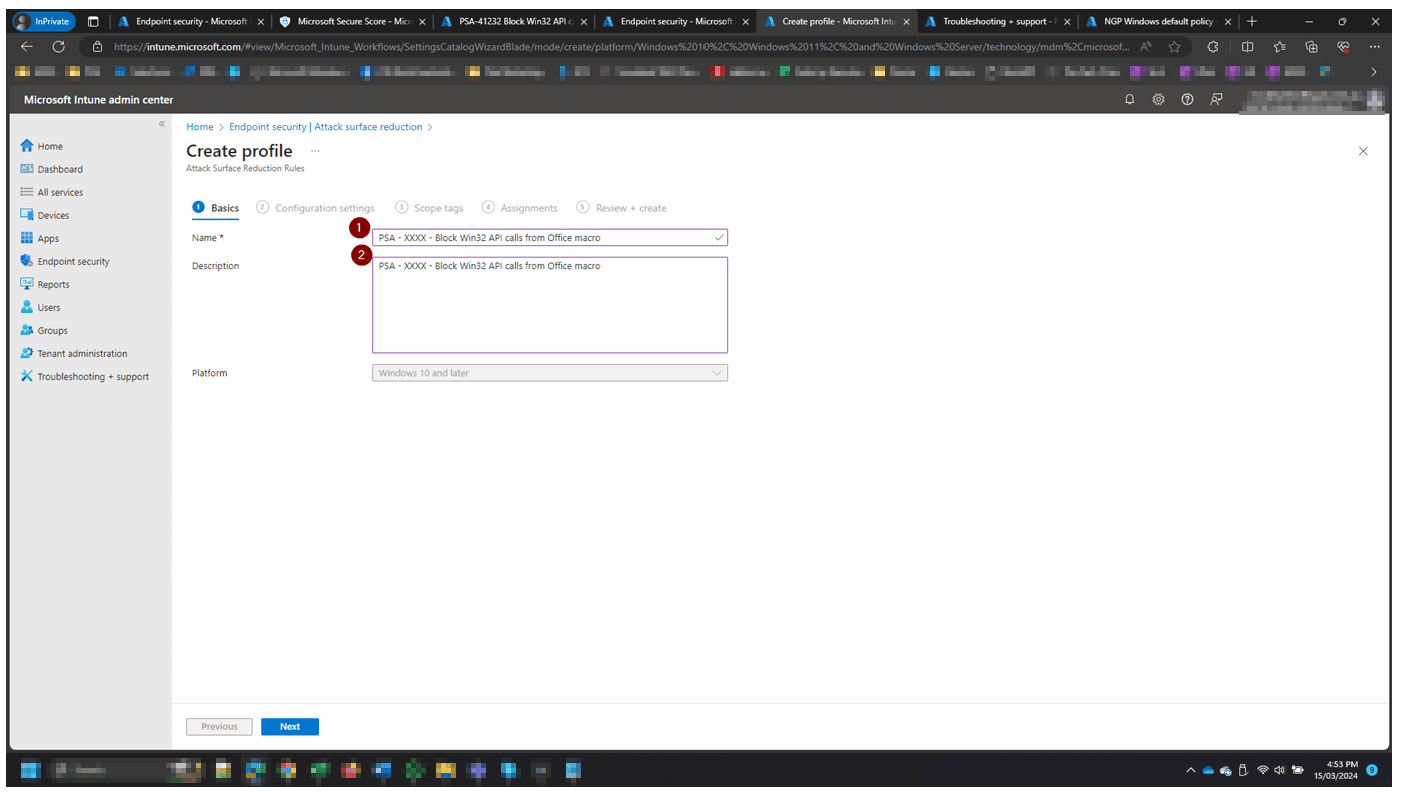
Name and describe the policy

Enter the policy name as PSA – XXXX – Block Win32 API calls from Office macro and add a matching description. Confirm the Platform shows Windows 10 and later, then click Next to move to Configuration settings.

Name and describe the policy
4
Screenshot required

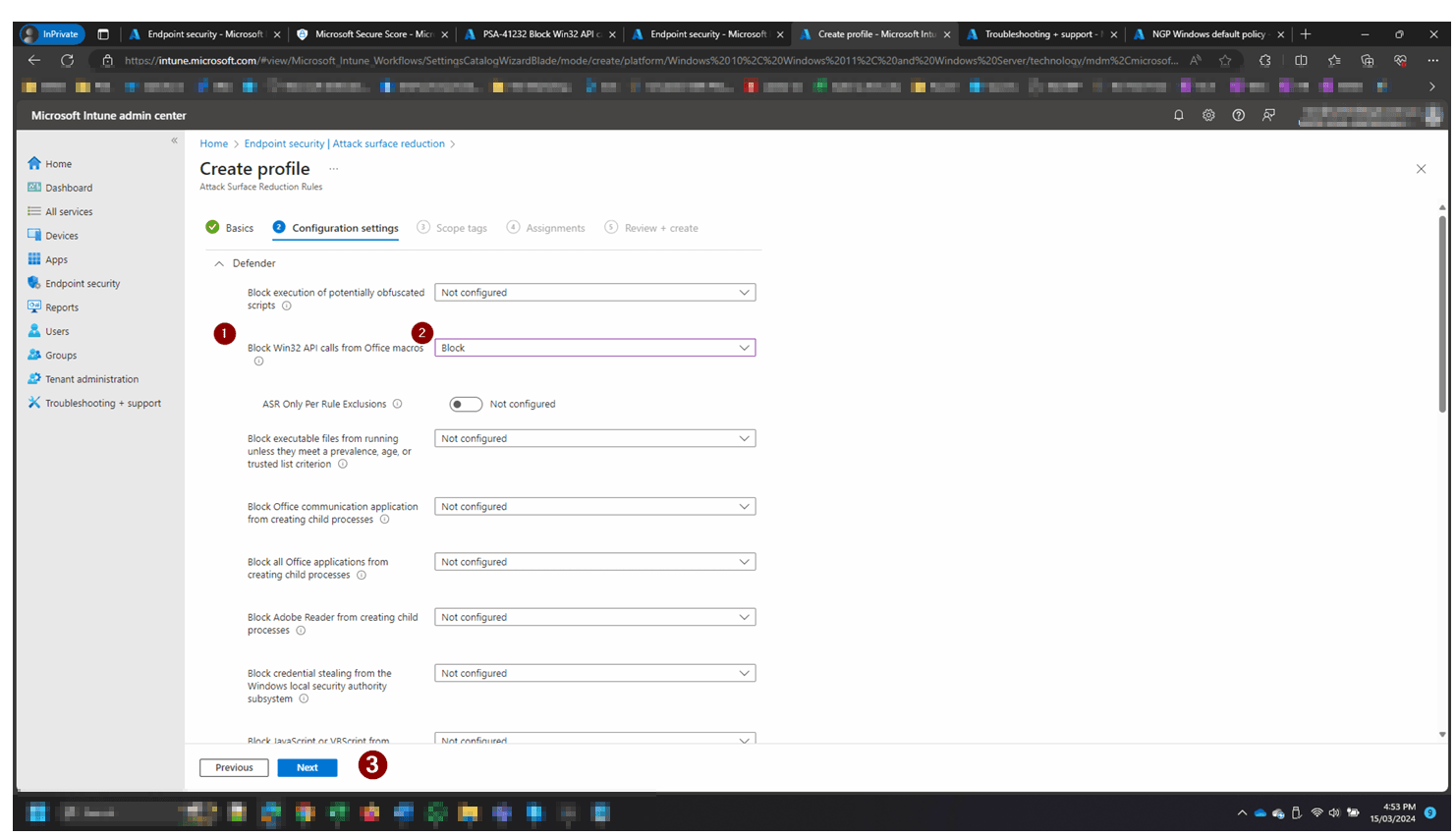
Set the Win32 API rule to Block

In Configuration settings under the Defender section, locate Block Win32 API calls from Office macros and use the dropdown to set it to Block. Leave all other rules as Not configured unless separately required. Click Next.

Set the Win32 API rule to Block
5
Screenshot required

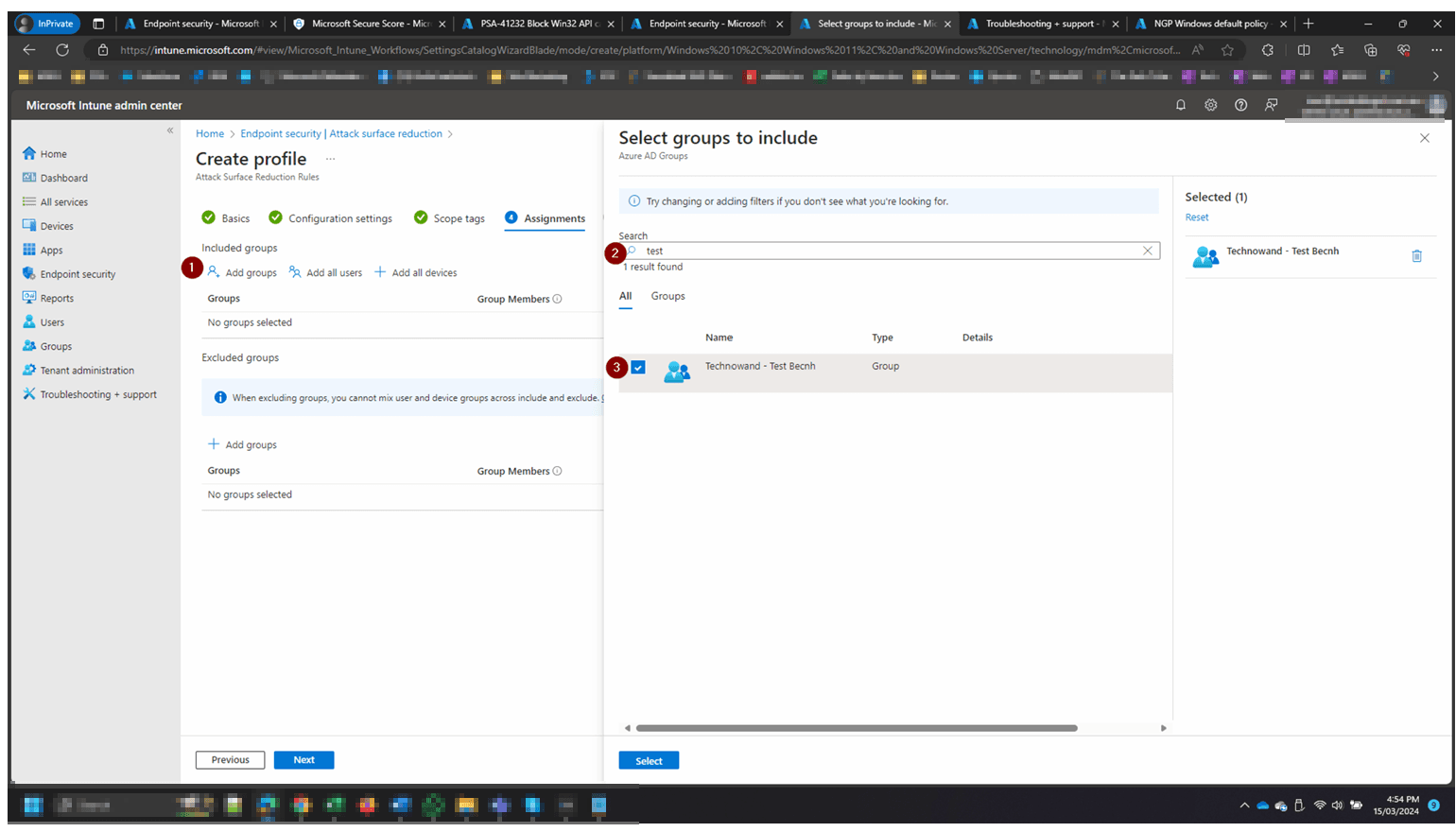
Assign the policy to the test bench group

On the Assignments tab, click Add groups under Included groups. In the Select groups panel, search for your test group (e.g. Technowand – Test Bench), select it, and click Select. Click Next to proceed to Review + create.

Assign the policy to the test bench group
6
Screenshot required

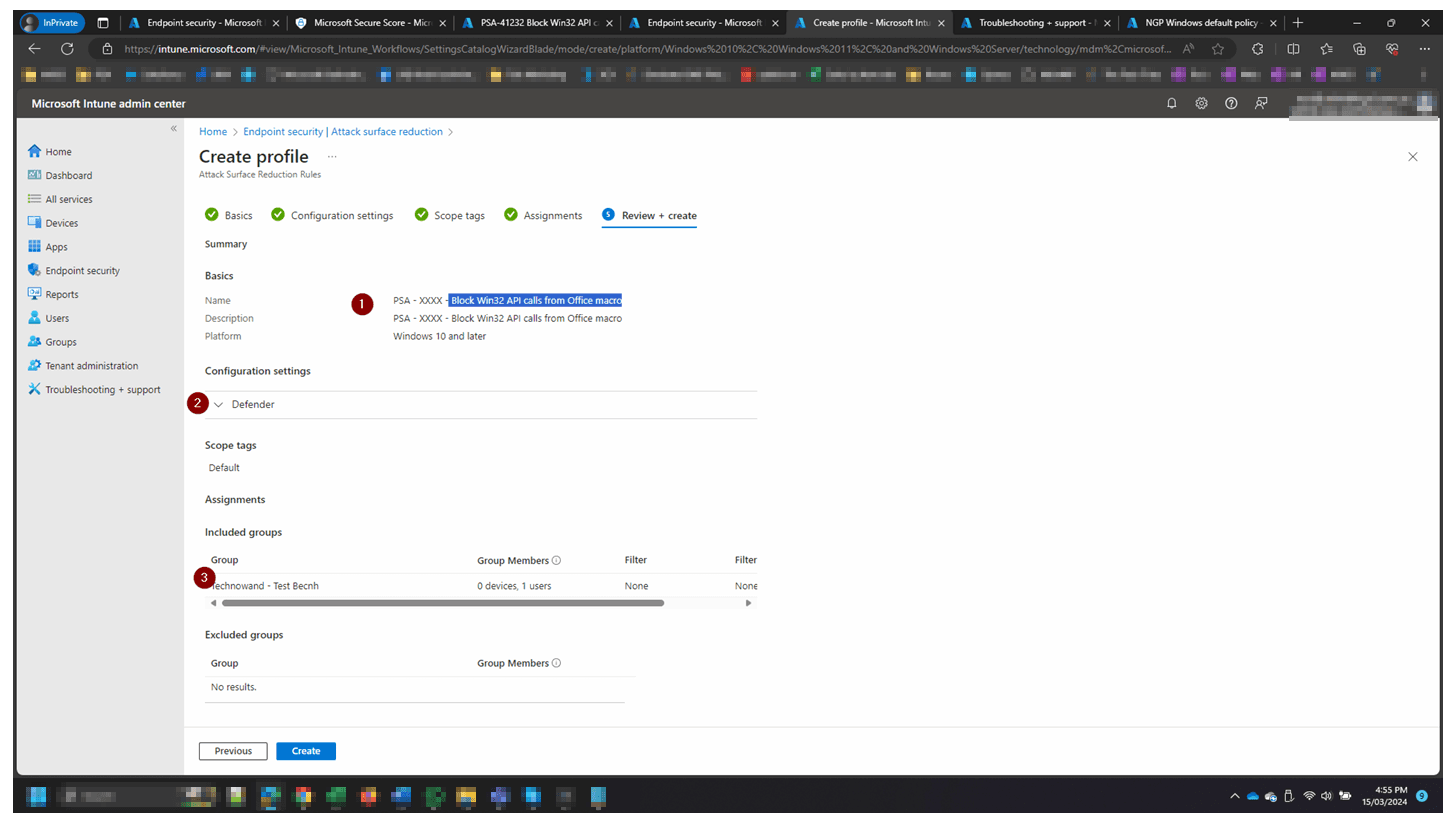
Review and create the policy

On the Review + create screen, verify the policy Name, confirm the Defender configuration shows Block for the Win32 API rule, and check the assigned group is correct. Once confirmed, click Create to deploy the policy.

Review and create the policy

How to confirm it worked

  • The policy shows a Succeeded status across all assigned device groups in Microsoft Intune.
  • The rule shows Block status in the ASR rules list in the Microsoft Defender portal under Settings → Endpoints → Attack surface reduction rules.
  • No blocked Win32 API call events from legitimate business applications appear in Defender → Reports → Attack surface reduction.
  • Microsoft Secure Score shows the 'Block Win32 API calls from Office macro' recommendation status as Completed (allow up to 24 hours to update).

FAQ

What does blocking Win32 API calls from Office macros actually do?

It prevents Office macros from making direct calls to the Windows 32-bit API layer. Without this protection, malicious macros can use Win32 API calls to download files, inject code into other processes, or execute commands in ways that bypass standard macro security controls. Blocking this behaviour removes a key technique used in document-based malware attacks.

Will this rule break any legitimate business macros?

Most standard business macros that perform data processing, formatting, or Office automation are unaffected. Macros that specifically use Win32 API declarations (such as Declare statements in VBA) to call external DLLs will be blocked. Deploy in Audit mode first for 7–14 days to identify any impact before switching to Block.

Do I need a specific Microsoft licence to use this ASR rule?

Yes. Attack Surface Reduction rules require Microsoft Defender for Endpoint Plan 1 or Plan 2, or Microsoft 365 Business Premium. They are not available on Microsoft 365 Business Basic or Business Standard plans.

How long until my Secure Score updates after enabling this rule?

Secure Score typically updates within 24 hours of the rule being enforced in Block mode. If it has not updated after 48 hours, confirm the rule is set to Block (not Audit) and that all relevant devices are fully onboarded to Microsoft Defender for Endpoint.

What is the Rule ID for this ASR rule if deploying via Group Policy?

The Rule ID for Block Win32 API calls from Office macros is 92E97FA1-2EDF-4476-BDD6-9DD0B4DDDC7B. You can use this GUID when deploying via Group Policy or other management tools. However, Microsoft Intune is the recommended deployment method for most Microsoft 365 Business Premium environments as it provides centralised reporting and compliance visibility.

Need help reviewing your Microsoft 365 security?

Our team can assess your full Attack Surface Reduction configuration, prioritise the highest-impact rules, and give you a clear remediation roadmap tailored to your environment.