Secure Score How-To

← Back to Secure Score Hub

How to Block Office Apps from Creating Child Processes in Microsoft 365

Last updated: April 2026

Microsoft Office applications — Word, Excel, PowerPoint — can launch child processes when handling documents, and attackers exploit this to execute malicious payloads. This guide walks you through enabling the Attack Surface Reduction rule in Microsoft Defender for Endpoint that blocks this behaviour and lifts your Secure Score.

This is a how-to page. The CTA stays soft, the steps stay clean, and the cluster links handle the rest.

What you'll achieve

Blocked attack pathOffice apps will be prevented from spawning child processes that attackers use to run malicious scripts or executables.
Reduced attack surfaceYour endpoint ASR rule will be active and enforced across Intune-managed devices, closing a widely exploited gap.
Secure Score upliftOnce the rule is in Block mode, Microsoft marks this recommendation as Completed, adding points to your Secure Score.

Why this setting matters

Office documents are among the most common delivery mechanisms for malware in Australia. When a user opens an infected Word or Excel file, the application can — by default — launch child processes such as command prompts, PowerShell, or other executables to execute embedded code.

  • Malicious macros and scripts embedded in Office files routinely use child processes to execute payloads.
  • Blocking child process creation is one of the highest-impact ASR rules for organisations that rely on Office productivity tools.
  • This rule is a direct Microsoft Secure Score recommendation with measurable, immediate score impact once enforced.
Blocking Office child process creation is a proven, low-disruption ASR rule — high security value, broadly applicable, and a clear Secure Score win for any business running Microsoft 365.
Before you start

  • Microsoft 365 Business Premium, or Microsoft Defender for Endpoint Plan 1 or Plan 2 licence.
  • Global Administrator or Security Administrator permissions in your Microsoft 365 tenant.
  • Devices onboarded to Microsoft Defender for Endpoint.
  • Microsoft Intune configured if deploying via policy — the recommended method for most organisations.
  • Run in Audit mode first for 7–14 days to check for false positives before switching to Block.

Step-by-step

Use these steps to locate, configure, test, and confirm the Office child process ASR rule in Microsoft Defender for Endpoint.

1
Screenshot required

Open the Microsoft Intune Admin Center

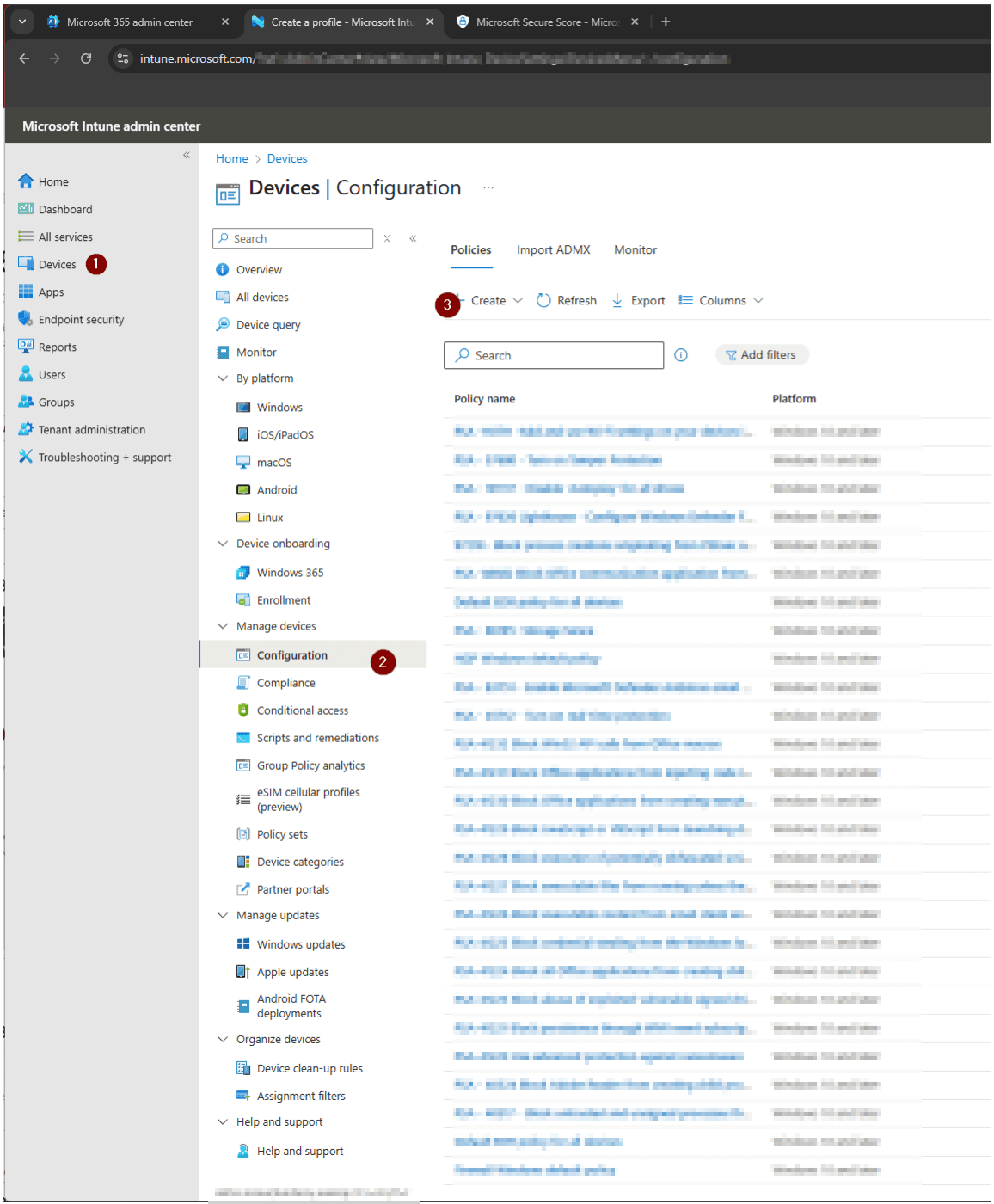
Go to intune.microsoft.com → on the left side of the screen, click Devices → once click, Configuration → Click Create Policy

Open the Microsoft Intune Admin Center
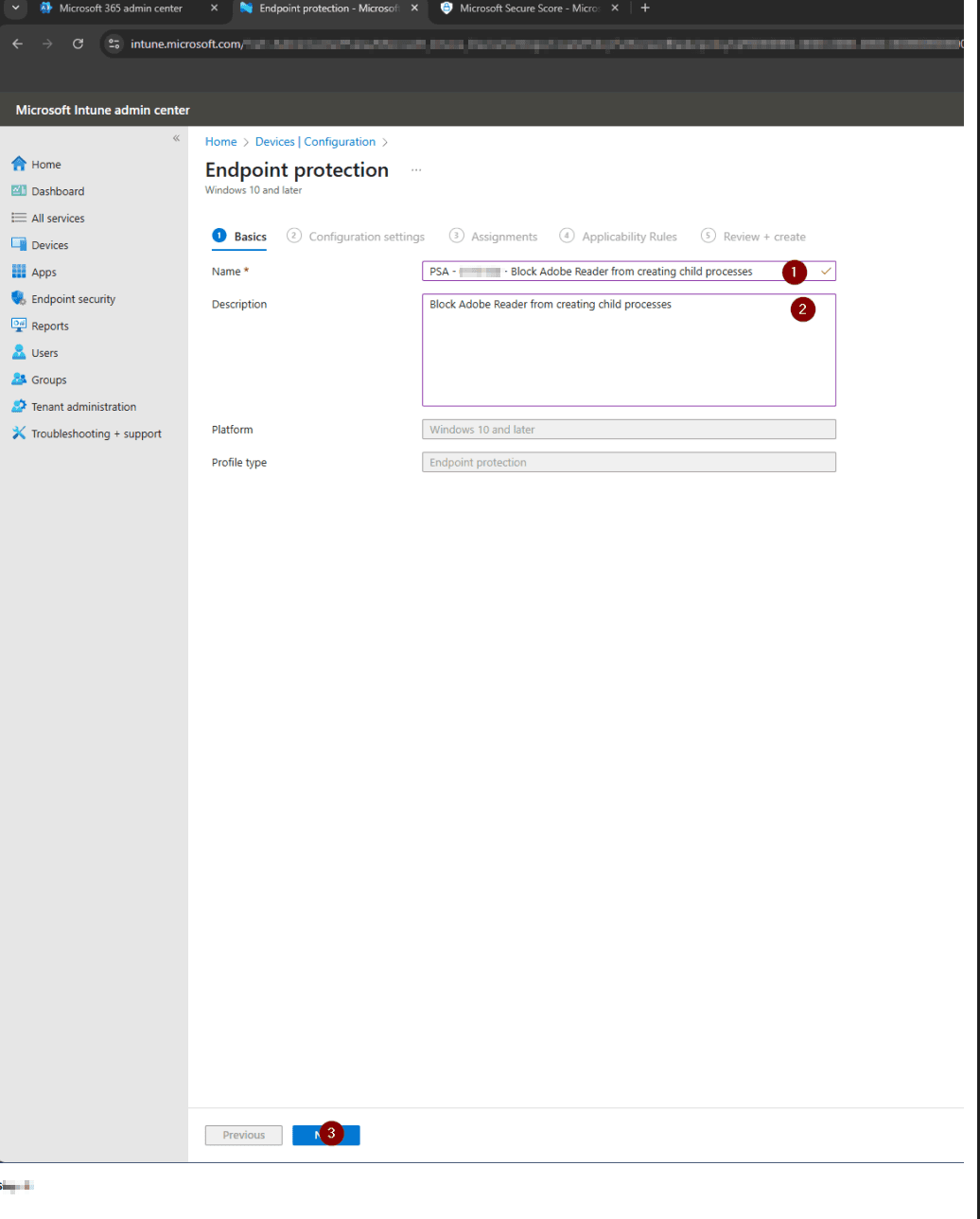
2
Screenshot required

Add Name and Description at Endpoint Protection

Once inside create → You'll be route to Endpoint Protection, Input the Name and Description → Click Next once confirmed

Add Name and Description at Endpoint Protection
3
Screenshot required

Setting up Configuration settings

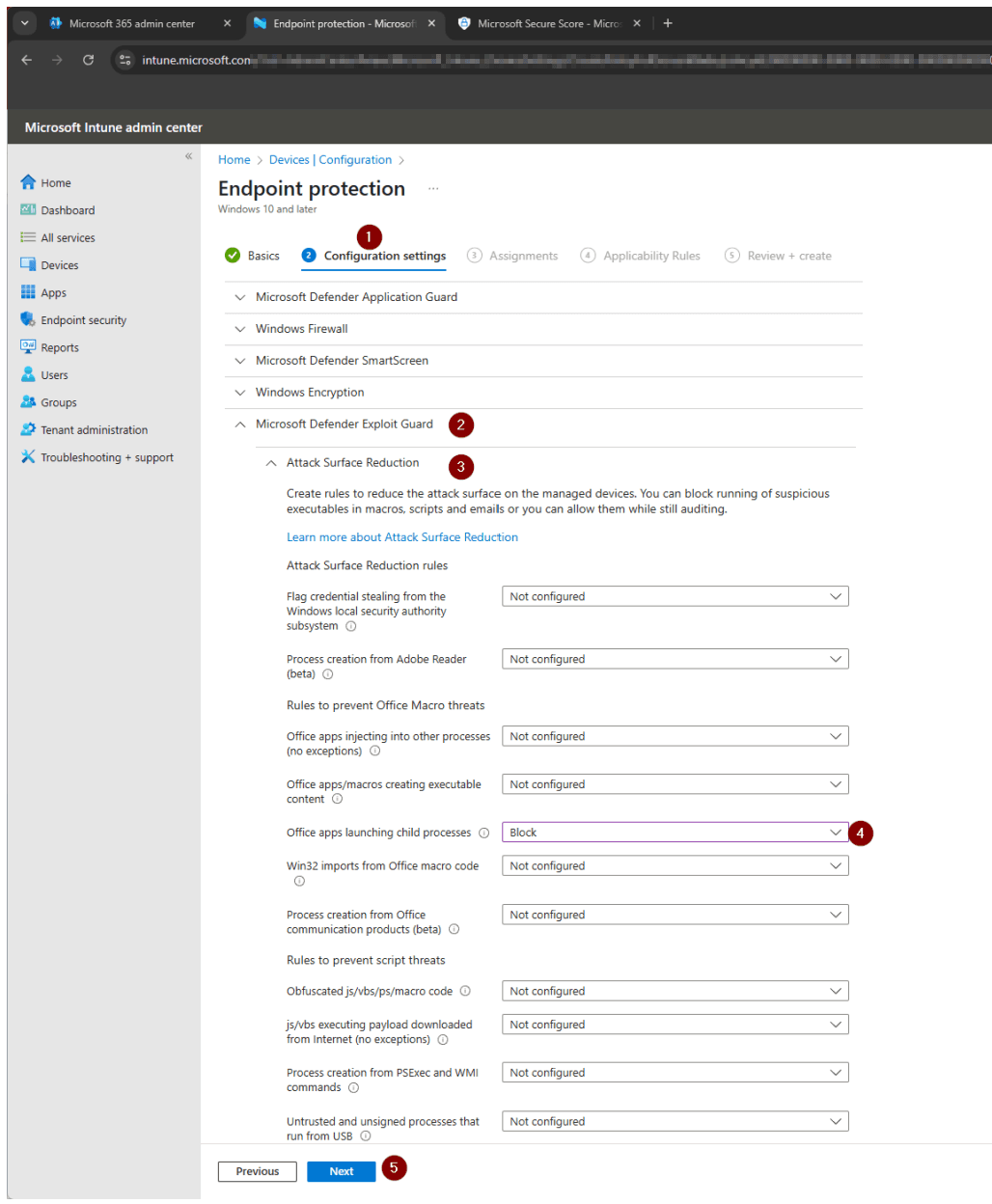
After clicking Next → Set up the Configuration settings → Select Microsoft Defender Exploit Guard → Choose Attack Surface Reduction → Look for Office apps launching child processes → Click the drop arrow located at right and choose Block → After verifying click Next

Setting up Configuration settings
4
Screenshot required

Assign the policy to device groups

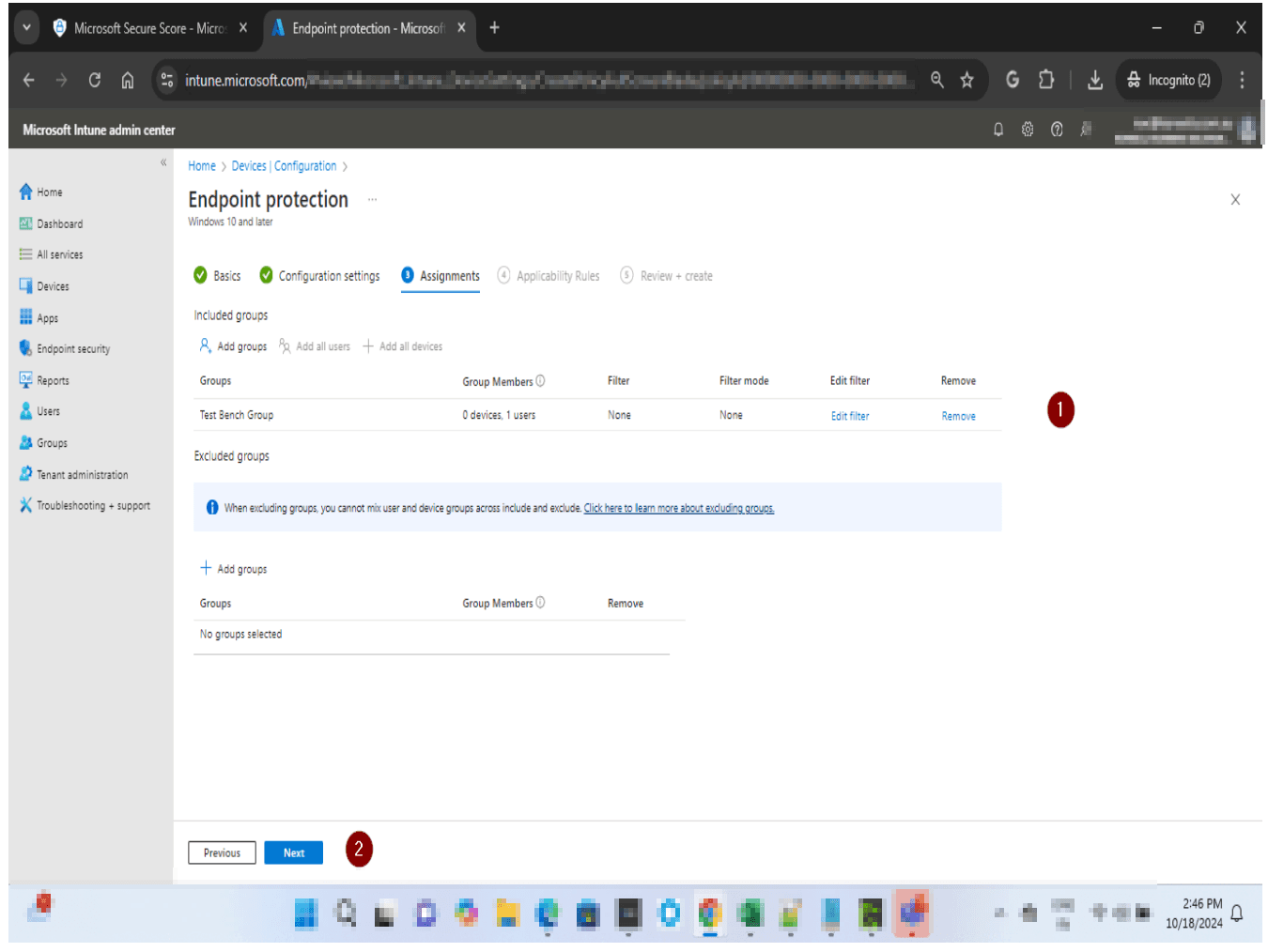
Assign the new policy to your device groups — start with a test group first. After 7 days in Audit mode with no issues, expand assignment to all users and devices. Click Next, then Review + create.

Assign the policy to device groups
5
Screenshot required

Confirm and switch to Block mode

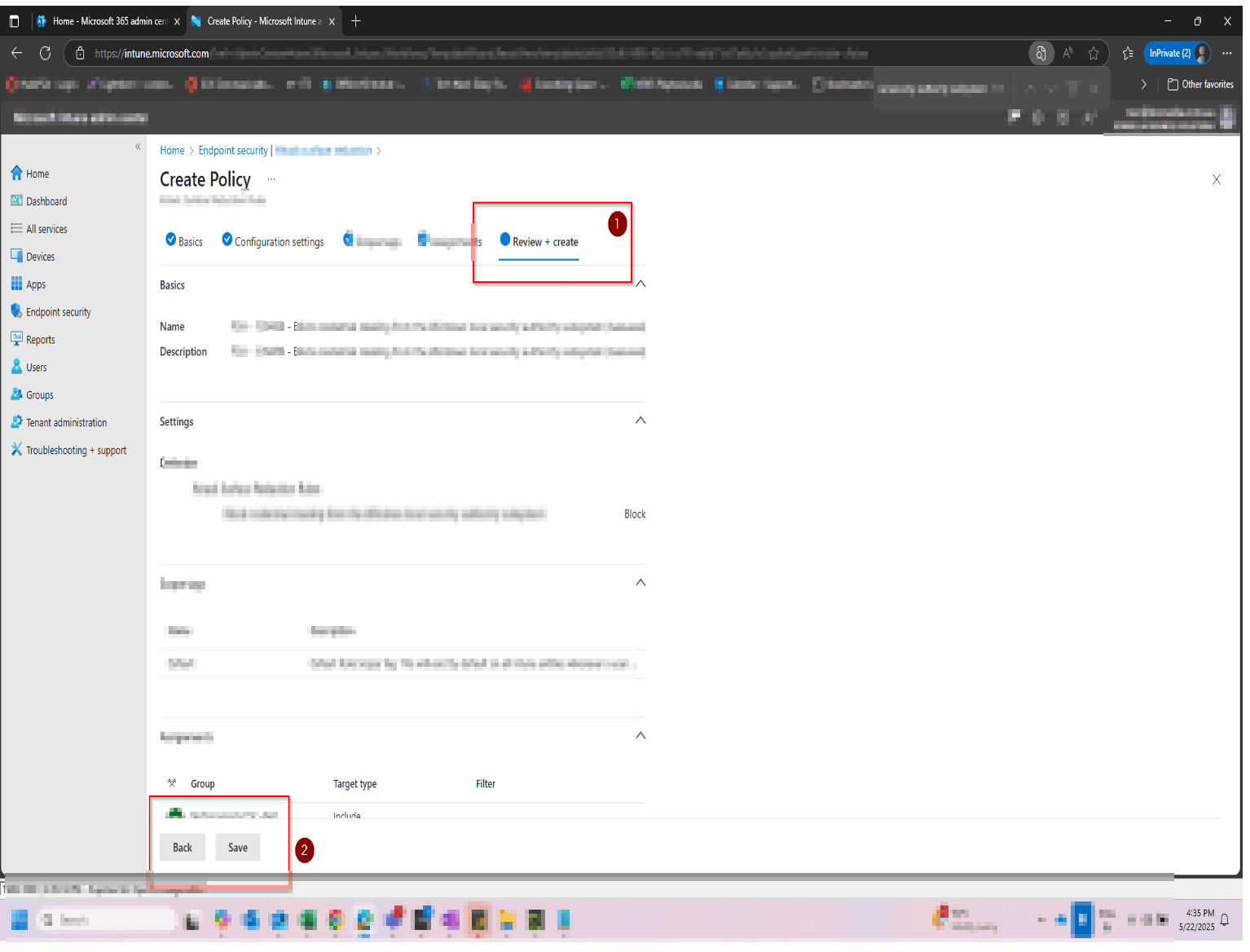
Once Audit mode has run cleanly for 7–14 days, return to the policy in Intune and change the rule state from Audit to Block. Save and allow up to 24 hours for your Secure Score to update.

Confirm and switch to Block mode

How to confirm it worked

  • The rule shows Block status in the ASR rules list in the Microsoft Defender portal.
  • No Office child process events appear in Defender → Reports → Attack surface reduction.
  • Microsoft Secure Score shows the recommendation status as Completed.
  • In Intune, the ASR policy shows Succeeded across all assigned device groups.

FAQ

What does blocking Office apps from creating child processes actually do?

It prevents Word, Excel, PowerPoint, and other Office applications from launching child processes — such as command prompts, PowerShell, or other executables — when handling documents. This cuts off a common attack path where malicious macros or embedded scripts in Office files try to run code outside the application itself.

Will this break Office for my users?

Standard Office use — creating and editing documents — is unaffected. Some advanced scenarios involving macros that launch external applications or scripts will be blocked. Run in Audit mode first for 7–14 days to identify any impact in your specific environment before switching to Block.

Do I need Microsoft Defender for Endpoint to use this rule?

Yes. Attack Surface Reduction rules require Microsoft Defender for Endpoint Plan 1 or Plan 2, or Microsoft 365 Business Premium. They are not available on Microsoft 365 Business Basic or Business Standard plans.

How long until my Secure Score updates after enabling this rule?

Secure Score typically updates within 24 hours of the rule being enforced in Block mode. If it has not updated after 48 hours, confirm the rule is set to Block (not Audit) and that all relevant devices are fully onboarded to Microsoft Defender for Endpoint.

Can I deploy this rule via Group Policy instead of Intune?

Yes. You can configure ASR rules via Group Policy using the Rule ID d4f940ab-401b-4efc-aadc-ad5f3c50688a. However, Intune is the recommended deployment method for Microsoft 365 Business Premium environments as it provides centralised reporting and compliance visibility through the Intune admin centre.

Which Microsoft Office applications does this rule cover?

The rule covers Word, Excel, PowerPoint, and other Office productivity apps. It does not apply to Outlook — that application is covered by separate ASR rules targeting email-based attack vectors.

Need help reviewing your Microsoft 365 security?

Our team can assess your full Attack Surface Reduction configuration, prioritise the highest-impact rules, and give you a clear remediation roadmap tailored to your environment.

Book a Security AssessmentView the Secure Score hub