Secure Score How-To

← Back to Secure Score Hub

How to Block Executable Content from Email Using ASR Rules

Last updated: April 2026

Emails carrying executable attachments are one of the most consistent entry points for malware in Australian businesses. This guide walks you through enabling the Attack Surface Reduction rule in Microsoft Defender for Endpoint that blocks executable content launched from email clients and webmail — and earns you a direct Secure Score improvement.

This is a how-to page. The CTA stays soft, the steps stay clean, and the cluster links handle the rest.

What you'll achieve

Blocked malware delivery pathExecutables launched from email clients or webmail — a primary ransomware delivery method — will be prevented from running.
Reduced attack surfaceThe ASR rule adds a hard enforcement layer that stops threats even when users accidentally open malicious attachments.
Secure Score upliftOnce the rule is set to Block mode and deployed, Microsoft marks this recommendation as Completed and updates your score.

Why this setting matters

Email is still the number one delivery method for malware — including ransomware. While most organisations have spam filters and antivirus in place, attackers have become skilled at bypassing signature-based detection. Executable content embedded in or attached to emails can still run if a user interacts with it and the right controls aren't configured.

  • Executables launched from email bypass perimeter defences that only inspect inbound messages.
  • Webmail clients (including Outlook on the web) are targeted specifically because users often treat them as "safer" than desktop clients.
  • This ASR rule is a direct Secure Score recommendation with a measurable point impact — low disruption risk, clear security benefit.
Blocking executable content from email is one of the highest-value ASR rules available — it targets the most common malware delivery path and typically causes minimal disruption to legitimate workflows.
Before you start

  • Microsoft 365 Business Premium, or Microsoft Defender for Endpoint Plan 1 or Plan 2 licence.
  • Global Administrator or Security Administrator permissions in your tenant.
  • Devices onboarded to Microsoft Defender for Endpoint.
  • Microsoft Intune configured if deploying via policy (recommended for all managed environments).
  • Run in Audit mode for 7–14 days before switching to Block to identify any false positives in your environment.

Step-by-step

Use these five steps to locate, configure, test, and confirm the executable content from email ASR rule in Microsoft Defender for Endpoint.

1
Screenshot required

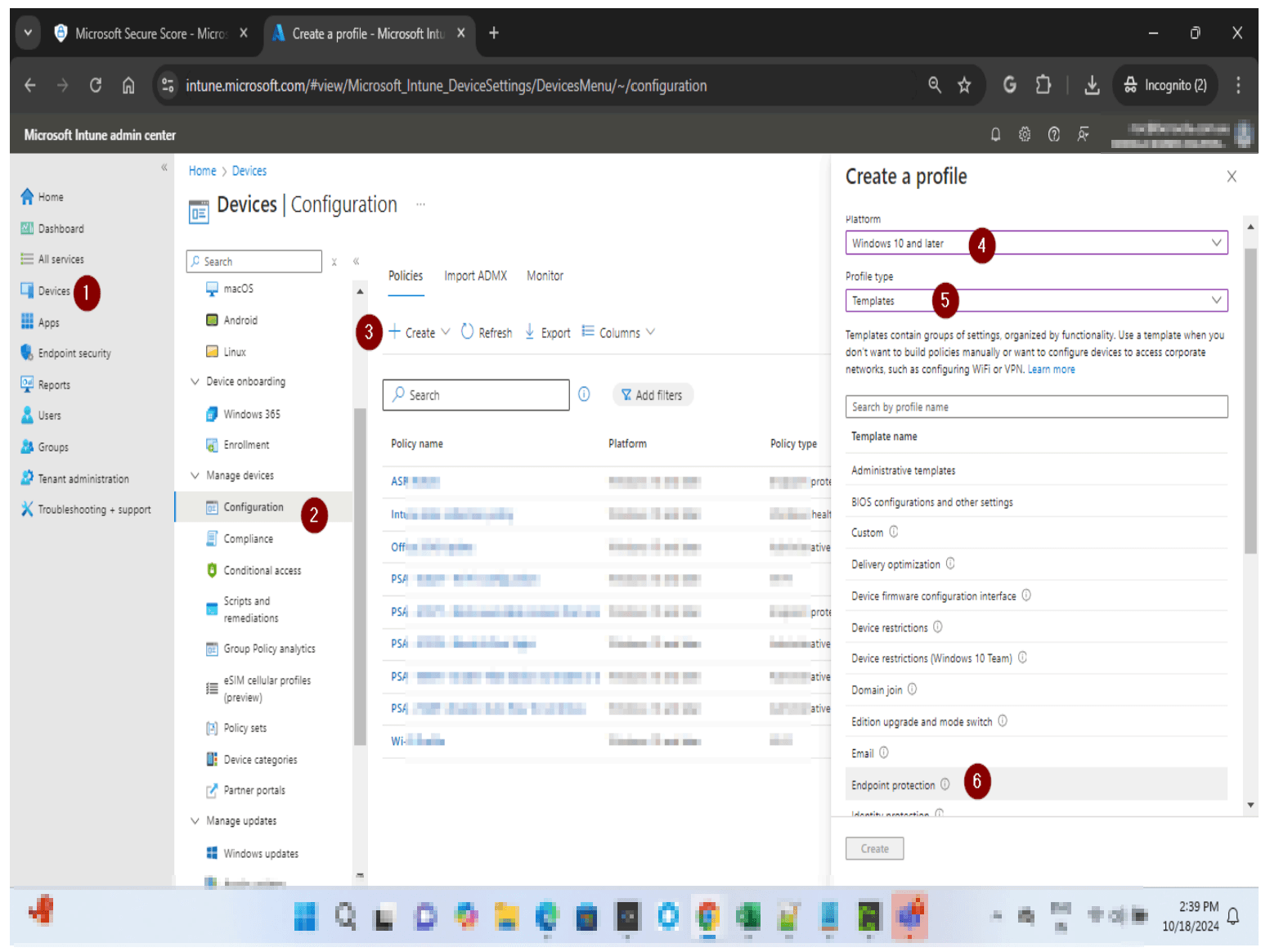
Open the Microsoft Intune portal

Go to intune.microsoft.com and sign in with your Global Administrator. In the left navigation, select Endpoint security — this is where Attack surface reduction security policies. Click create to Create a profile → In Platform, click the drop down arrow and choose Windows 10 and later. For Profile type click the drop down arrow and select Templates. On Templates Search Endpoint Protection. Once confirmed click create.

Open the Microsoft Intune portal
2
Screenshot required

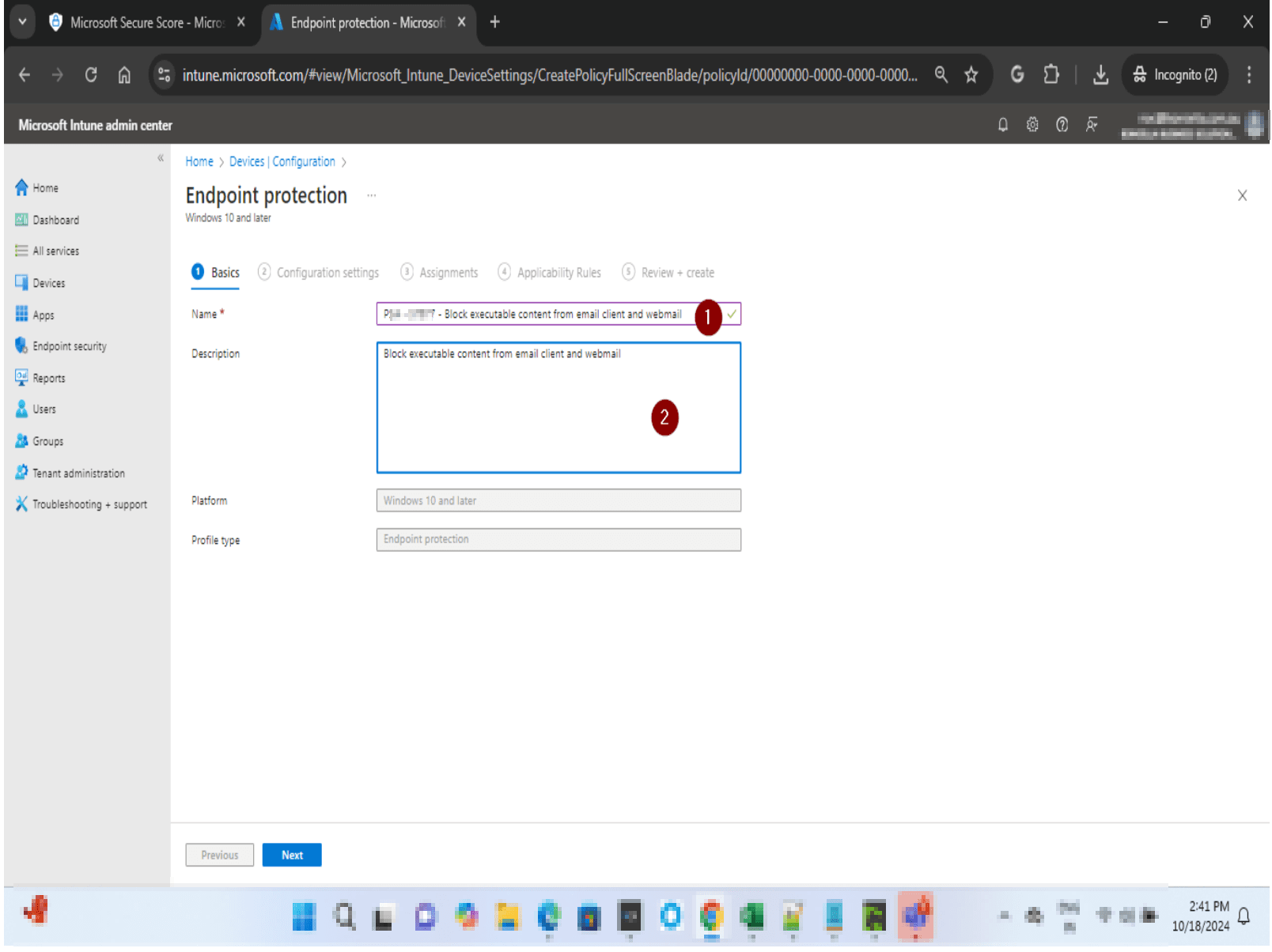
Name the policy and open Configuration settings

Give your policy a clear name — for example, ASR - Block Executable Email Content. Click Next to proceed to Configuration settings, where you will find the full list of ASR rules available for your tenant.

Name the policy and open Configuration settings
3
Screenshot required

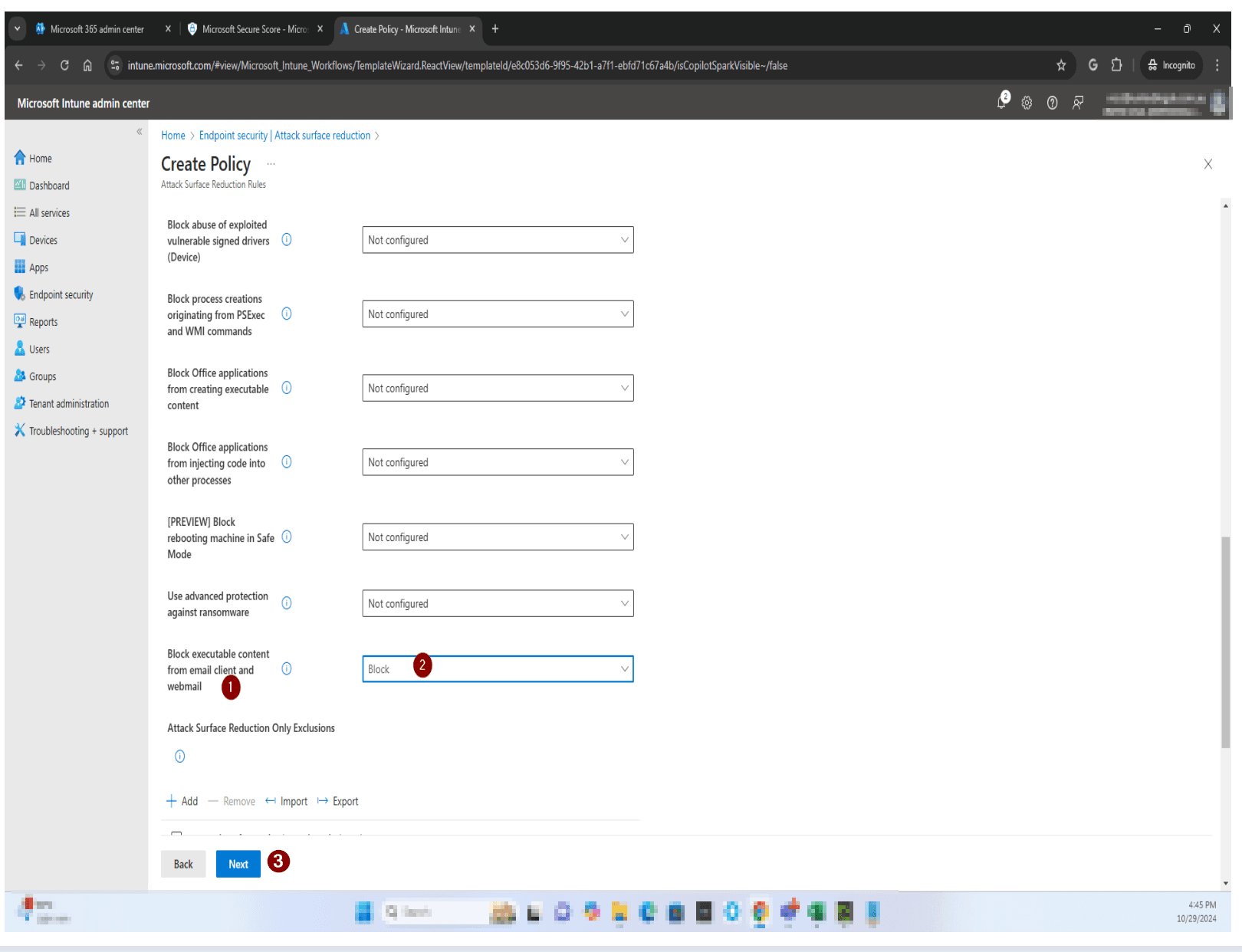
Locate and enable the executable content rule

Find the rule named Block executable content from email client and webmail. It may show as Not configured or Audit if not yet set. Change it to Block. The Rule ID for reference or Intune deployment is BE9BA2D9-53EA-4CDC-84E5-9B1EEEE46550. Click Next when done.

Locate and enable the executable content rule
4
Screenshot required

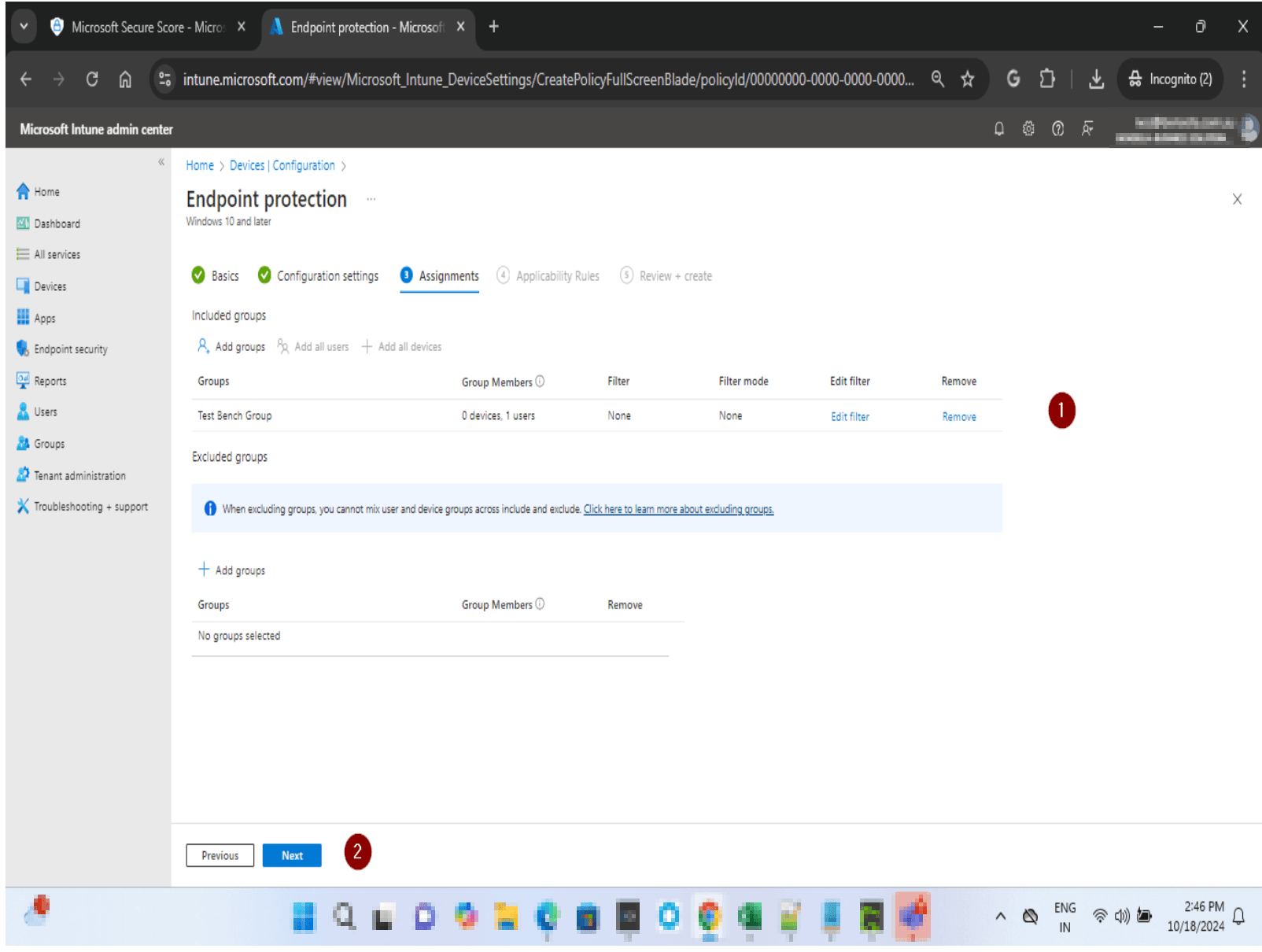
Assign the policy and monitor

Assign the policy to a test group first — a small set of devices where you can monitor for false positives over 7 days. Once you're satisfied, reassign to all users and all devices. After full deployment, allow up to 24 hours for Secure Score to reflect the change.

Assign the policy and monitor
5

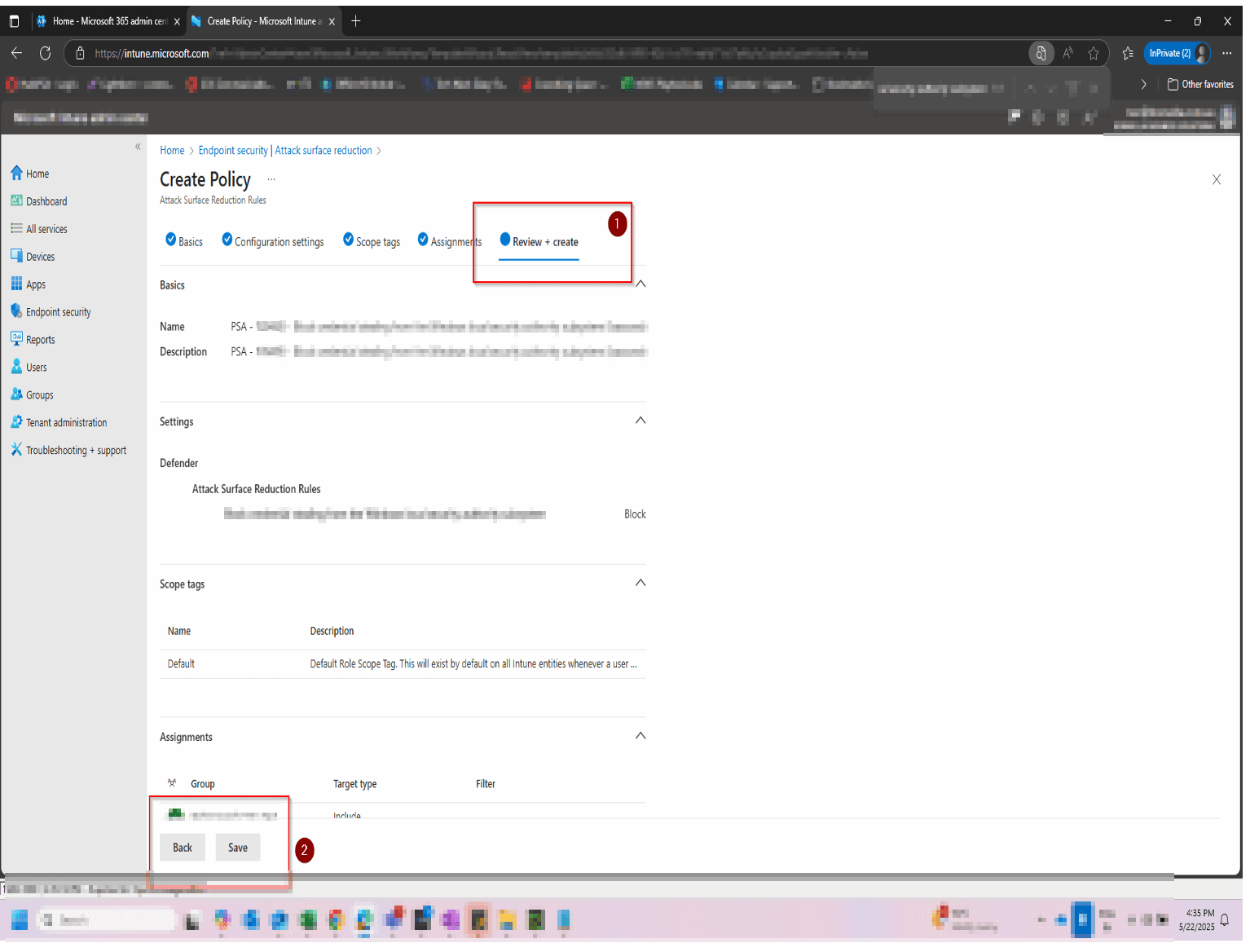
Review + Create

Review all the necessary details and click save

Review + Create

How to confirm it worked

  • The rule shows Block status in Endpoint security → Attack surface reduction in the Defender portal.
  • No blocked executable events appear unexpectedly in Defender → Reports → Attack surface reduction (check for legitimate false positives).
  • Microsoft Secure Score shows the recommendation status as Completed in the Secure Score dashboard.
  • In Intune, the ASR policy shows Succeeded across all assigned device groups under Endpoint security → Attack surface reduction.

FAQ

What does blocking executable content from email actually do?

It prevents executable files — such as .exe, .dll, .ps1, and script-based payloads — from being launched directly from an email client or webmail interface. If a user receives a malicious attachment and tries to run it, the ASR rule blocks the execution before it can cause damage.

Will this affect legitimate attachments my staff open from email?

Standard document types like Word, Excel, and PDFs are unaffected. The rule specifically targets executable content — files that attempt to run as programs. Run the rule in Audit mode for 7–14 days first to identify any legitimate use cases in your environment before switching to Block.

How is this different from standard email filtering or antivirus?

Email filtering and antivirus work primarily on known signatures — they block threats they can identify. ASR rules operate at the endpoint and enforce behavioural restrictions regardless of whether a threat has been seen before. This means new or zero-day malware delivered via email is still blocked even if it hasn't been added to signature databases yet.

Do I need a specific Microsoft licence to use this rule?

Yes. Attack Surface Reduction rules require Microsoft Defender for Endpoint Plan 1 or Plan 2, or Microsoft 365 Business Premium. They are not available on Microsoft 365 Business Basic or Standard licences. If you're unsure what you have, check your licences at admin.microsoft.com under Billing → Licences.

How long until my Secure Score updates after enabling this rule?

Secure Score typically updates within 24 hours of the rule being enforced in Block mode across your devices. If it hasn't updated after 48 hours, confirm the rule is set to Block (not Audit) and that all target devices are fully onboarded to Defender for Endpoint.

Need help reviewing your Microsoft 365 security?

Our team can assess your full Attack Surface Reduction configuration, identify the highest-impact rules yet to be enabled, and help you build a clear remediation roadmap to improve your Secure Score.